

Deevid AI
AI video platform for text, image, and video generation
Deevid AI is an AI video platform that helps users create videos from text, images, and existing clips. It is useful for creators and marketers who want a simple way to generate AI videos with fast workflows and multiple model options.
Overview
Deevid AI is an AI video creation platform designed to help users turn text, images, and videos into polished visual content quickly and with very little technical setup.
What it can do:
- Generate videos from text prompts
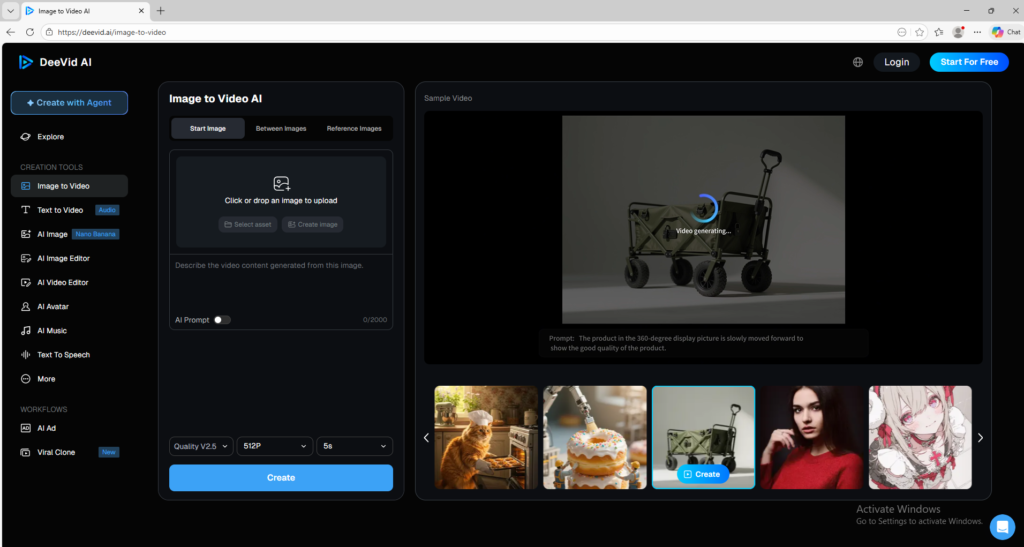
- Animate still images into short video clips
- Transform existing videos into new styles
- Let users try multiple AI video models in one place
- Support fast video creation for social media, marketing, and creative content
Who should use it:
Creators, marketers, small businesses, social media users, and beginners who want an easy way to generate AI videos without learning complex editing tools.
Things to note:
The platform uses credits and plan limits. While it is beginner-friendly, output quality and available models can vary depending on the plan and the workflow you choose.
Final quick verdict:
Deevid AI is a practical AI video tool for users who want an easy prompt-based workflow and access to multiple video models from one dashboard.
How to Use
1. Visit the official Deevid AI website and create an account or sign in.
2. Start with the free trial or free credits so you can test the platform before paying.
3. Choose the workflow you want to use first, such as Text to Video, Image to Video, or Video to Video.
4. If you choose Text to Video, write a clear prompt that describes the scene, movement, mood, camera angle, and style you want.
5. If you choose Image to Video, upload a clear source image and add a short prompt explaining the motion you want to create.
6. If you choose Video to Video, upload an existing clip and select the style or transformation you want the AI to apply.
7. Review any available model choices or settings, such as duration, style, aspect ratio, or output quality.
8. Generate a first draft and wait for the system to process the request.
9. Watch the output carefully and decide whether you need to adjust the prompt, source image, or style settings.
10. When you get a useful result, download the video and keep a note of which prompt and settings worked best for future projects.
Screenshots