

Runway Gen-4.5
Runway’s advanced AI video model for precise cinematic generation
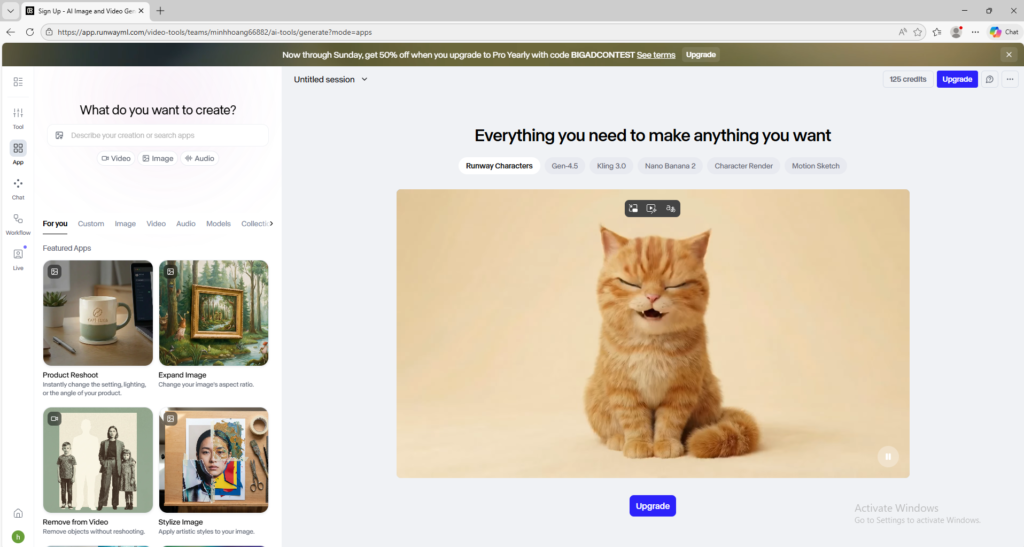
Runway Gen-4.5 is Runway’s advanced AI video model for text-to-video and image-to-video generation with stronger motion quality and prompt control. It is useful for creators and professionals who want a more precise and production-oriented video workflow.
Overview
Runway Gen-4.5 is Runway’s advanced video generation model designed to deliver stronger motion quality, prompt adherence, and visual fidelity for text-to-video and image-to-video workflows.
What it can do:
- Generate videos from text prompts
- Generate videos from text plus image input
- Follow more complex instructions than simpler video models
- Support stronger scene control, prompt accuracy, and cinematic output
- Help creators produce more polished and controllable AI video content
Who should use it:
Creators, filmmakers, marketers, designers, and advanced AI video users who want stronger control, better motion quality, and a more professional video generation workflow.
Things to note:
Gen-4.5 is not the same as the general free Runway experience. Official documentation says Gen-4.5 currently requires Standard and higher plans, so this model should be treated as a paid feature entry rather than a free beginner tool.
Final quick verdict:
Runway Gen-4.5 is a high-end AI video model for users who want more precise prompting, better motion quality, and a workflow closer to professional creative production.
How to Use
1. Make sure your Runway account has access to Gen-4.5. Official Runway documentation says the model requires Standard and higher plans, so confirm your plan before trying to use it.
2. Log in to Runway and open the Apps View. In the search bar, type “Gen-4.5” to locate the model, or switch to Video mode and choose Gen-4.5 from the model selector.
3. Decide whether you want to use Text to Video or Image to Video. If you already have a strong visual reference, Image to Video is often easier to control. If you want to build the scene entirely from imagination, use Text to Video.
4. Write a prompt with clear structure. For best results, describe the subject, action, environment, lighting, mood, and camera behavior. Runway’s own guidance highlights that Gen-4.5 is especially good at handling detailed camera choreography and sequenced instructions.
5. If you use Image to Video, upload a strong source image that clearly shows the subject and composition you want to animate. Then write a prompt explaining the movement, timing, and scene behavior you want the model to add.
6. Choose the output settings that fit your goal. Official documentation notes supported durations of 2 to 10 seconds, web availability, and multiple aspect ratios with 720p output, so pick the ratio that matches your platform before generating.
7. Generate the first draft and review it carefully. Focus on motion realism, subject consistency, prompt accuracy, and whether the camera movement behaves the way you intended.
8. If the result is not strong enough, improve the prompt in layers. First fix the subject and action, then refine the environment, and finally adjust the camera language. This usually works better than rewriting the whole prompt from scratch.
9. Save any prompt that performs well, especially if you are building a repeatable creative workflow for ads, scenes, or branded content.
10. Once you are comfortable with the basics, use Gen-4.5 for polished concept videos, cinematic experiments, storytelling tests, and higher-end production workflows where prompt control matters.
Screenshots