

Wan2.6
Alibaba AI video model for cinematic scenes and synced audio
Wan2.6 is Alibaba’s AI video model for creating longer, higher-quality videos with stronger scene structure and audio support. It is useful for creators and advanced users who want a more production-oriented AI video workflow.
Overview
Wan2.6 is Alibaba’s advanced AI video generation model designed to create high-quality narrative videos with stronger scene structure, longer duration, and audio-aware output.
What it can do:
- Generate AI videos with more cinematic storytelling
- Support up to 15-second 1080p video creation in supported workflows
- Produce video with synced audio in supported modes
- Support automatic dubbing or custom audio input in official workflows
- Help creators and developers build stronger AI video pipelines for both creative and commercial use
Who should use it:
Creators, marketers, developers, and advanced AI video users who want stronger scene structure, better audio support, and more production-oriented control.
Things to note:
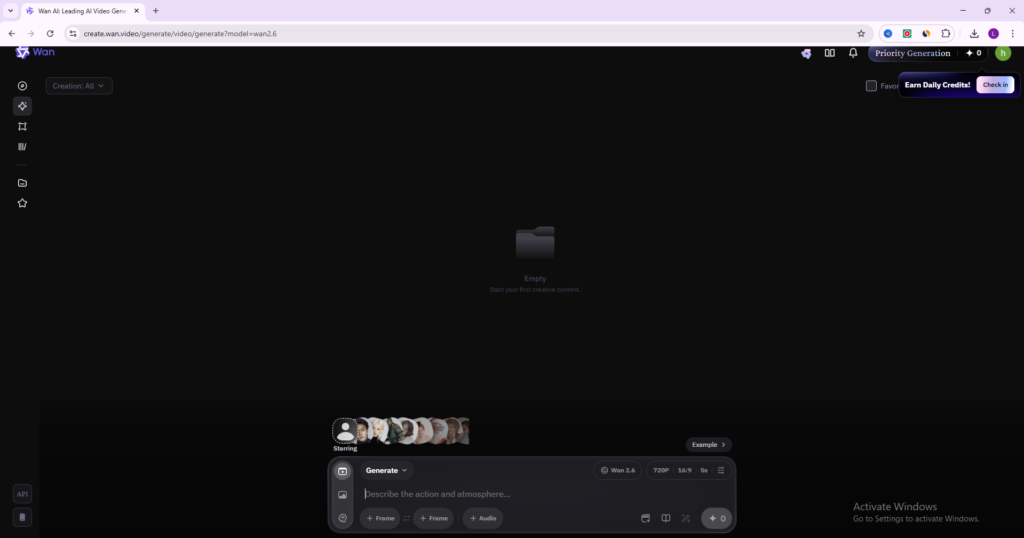
Wan2.6 appears across both consumer-style creation flows and Alibaba Cloud Model Studio workflows. Beginners can start from the simpler creation interface, while technical users can go deeper through Model Studio and API-based generation.
Final quick verdict:
Wan2.6 is a strong AI video option for users who want higher-end scene quality, better audio support, and a workflow that can scale from simple creation to more serious production.
How to Use
1. Visit the official Wan2.6 introduction page first so you understand what the model is designed for, then open the actual creation environment through Wan Create or Alibaba Cloud Model Studio depending on how you want to work.
2. If you want the easiest workflow, start from the Wan creation interface. If you are more technical or want deeper model control, open Alibaba Cloud Model Studio instead.
3. Decide what type of generation you want to run before writing any prompt. For example, choose whether you are creating from text only, from an image, or from a more advanced reference-based workflow if that is available to you.
4. Write a clear prompt with one main scene and one main action first. Wan2.6 handles richer storytelling well, but your early tests should stay simple so you can evaluate the model’s instruction following accurately.
5. If your workflow supports audio features, decide whether you want the model to auto-generate matching sound or whether you want to provide your own audio file. Official documentation notes that Wan2.6 supports automatic dubbing and custom audio input in supported workflows.
6. If you are using a consumer-style create page, review visible settings such as quality, duration, or aspect ratio before generating. If you are using Model Studio, make sure you select the correct Wan2.6 model and confirm the output settings you need.
7. Run a first-generation test and review the result for scene quality, motion stability, audio fit, and whether the pacing matches your prompt.
8. If the result is weak, improve the prompt in a controlled way. For example, make the action clearer, simplify the number of subjects, or tighten the camera and mood description instead of making the prompt much longer.
9. If Wan2.6 gives a strong output, save the prompt structure and settings that worked so you can repeat the workflow later. This is especially important for narrative clips and multi-shot ideas.
10. Once you are comfortable with the basics, use Wan2.6 for ad concepts, short cinematic stories, reference-driven experiments, and more advanced video generation workflows with or without synced audio.
Screenshots